
Your own control loop
Try one call first
Section titled “Try one call first”Before you write the loop, make one call and look at what comes back. The program below sends dreamlabs/dream-1-beta a still arm and nine black test pictures per camera, with no robot, and prints each key of the answer with its shape; it is the platform’s Query page, cut to the call. It reads your key from ~/.dreamlabs/credentials (Getting started). A model that is not running is started by the first call, which is refused pool_warming meanwhile: dreamlabs/dream-1-beta is normally kept running, but a model started from cold can take up to about half an hour. The program waits and asks again until it answers.
import base64
import time

import cv2
import numpy as np

import dream

black = np.zeros((176, 320, 3), dtype=np.uint8)
frame = base64.b64encode(cv2.imencode(".jpg", black)[1].tobytes()).decode("ascii")
frames = {"video.overhead": frame, "video.wrist_l": frame, "video.wrist_r": frame}
observation = {
    "prompt": "put the cup on the plate",
    "state.right_arm": [0.0] * 6, "state.right_gripper": [1.0],
    "state.left_arm": [0.0] * 6, "state.left_gripper": [1.0],
}

with dream.DreamClient() as client:
    client.policy({"checkpoint": "dreamlabs/dream-1-beta", "ik": {"arm": "yam", "head": "joint"}})
    for tick in range(9):
        client.set_observation(frames, observation, timestamp=tick * 0.2)
    refused = 0
    while True:
        try:
            action = client.get_action()
            break
        except dream.DreamServerError as error:
            # A model that keeps failing the call (reason "error") is not retried forever: stop after three in a row.
            refused = refused + 1 if error.reason == "error" else 0
            if not error.retryable or refused >= 3:
                raise
            wait = error.retry_after_s or 1.0
            print(f"waiting ({error.reason}), asking again in {wait:.0f} s")
            time.sleep(wait)
    for key, value in action["per_key"].items():
        print(key, np.shape(value))
The answer is 48 steps of motion for each arm, two ways at once. action.right_eef_xyz (48 x 3, metres) and action.right_eef_rot6 (48 x 6) are where the model wants the right hand, step by step, in the arm’s base frame, with action.right_grip ((48,)) for the gripper; the left arm has the same three. That hand pose is yours to use however you like: solve it to your arm’s joints with your own IK, feed it to your own controller, or only read it and drive another arm entirely. Or let the client do it: with "head": "eef" and your arm in ik, q_r_chunk and q_l_chunk come back already solved to your joints, which is what the rest of this page does. The whole answer is listed under What you get back.
If you run your own control loop on a YAM robot, call Dream-1 from it with dream.DreamClient. Your loop hands the client what the robot sees and feels, on every camera tick; Dream-1 answers with the next 48 joint targets for both arms. Everything else stays yours: timing, limits, the e-stop. This page covers every part of that exchange; it is what our own loop does for you once you set up the robot on the platform’s Robot Setup page. From The calls on, the code is one runnable program, yam_control_loop.py (download it): its FakeRobot, at the bottom of the file and not shown here, stands in for your robot’s driver, so the file runs as it is; replace it with your driver. On another robot (a Metal Arm, a Maker Arm, an SO-101 or one of your own), the calls are the same, and the ik key of the policy config turns the model’s answer into your arm’s joints: see On another arm. To watch and steer your loop from the platform’s Live View page, add dream.LiveViewClient to it: see Show your robot in Live View.
Have your coding agent write it
Section titled “Have your coding agent write it”Run these lines in the folder of your robot’s code. They give your coding agent these docs through the dreamlabs-docs server (an MCP server: pages a coding agent can read), with the key Getting started saved, then start it on your loop. It shows you the loop before anything moves and, once you type “the workspace is clear” to it, runs the check before the first real run (Check it before the first real run) and leaves its question about the page of what the model sees to you.
source ~/.dreamlabs/credentials
claude mcp add --transport http dreamlabs-docs "$DREAM_API_URL/mcp" \
  --header "Authorization: Bearer $DREAM_API_KEY"
claude "Add Dream-1 to my robot's control loop in this folder, as the dreamlabs-docs page 'Your own control loop' shows. Run nothing that moves the robot, except python -m dream.check once I have typed \"the workspace is clear\" to you: before the first real run, check my loop with it as that page says, leave its question about the page of what the model sees to me, and read its lines with me."
source ~/.dreamlabs/credentials && export DREAM_API_KEY
codex mcp add dreamlabs-docs --url "$DREAM_API_URL/mcp" \
  --bearer-token-env-var DREAM_API_KEY
codex "Add Dream-1 to my robot's control loop in this folder, as the dreamlabs-docs page 'Your own control loop' shows. Run nothing that moves the robot, except python -m dream.check once I have typed \"the workspace is clear\" to you: before the first real run, check my loop with it as that page says, leave its question about the page of what the model sees to me, and read its lines with me."
Codex reads the key from DREAM_API_KEY each time it starts: in a new terminal, run the first line again before codex.
The whole loop in one file
Section titled “The whole loop in one file”The Query test call, grown into a loop: on every tick it hands the client the cameras and the arms, and when the last chunk is played it asks for the next 48 rows and plays them, 20 a second. It runs as it is, on black frames and still arms. Replace the lines under the two Your comments with your robot’s.
import base64
import time

import cv2
import dream
import numpy as np

TASK = "put the cup on the plate"
CAMERAS = ("overhead", "wrist_l", "wrist_r")
PARTS = {
    "right_arm": [0, 6],
    "right_gripper": [6, 7],
    "left_arm": [7, 13],
    "left_gripper": [13, 14],
}
VIDEO = {role: f"observation.images.{role}" for role in CAMERAS}
YAM = {"state": PARTS, "action": PARTS, "video": VIDEO}

with dream.DreamClient() as client:
    client.policy({"checkpoint": "dreamlabs/dream-1-beta", "embodiment": YAM, "ik": {"arm": "yam", "head": "joint"}})
    view = dream.DebugView(client)  # open it before the arms move: each call as the model gets it
    print("what the model sees:", view.url)
    rows = []
    for _ in range(200):
        # Your robot now: each camera's newest image, then each arm's
        # 6 joints in radians and its gripper, 0 closed to 1 open.
        images = {role: np.zeros((360, 640, 3), np.uint8) for role in CAMERAS}
        right, left = np.zeros(7), np.zeros(7)

        frames = {}
        for role, image in images.items():
            ok, jpeg = cv2.imencode(".jpg", cv2.resize(image, (320, 176)))
            frames[f"video.{role}"] = base64.b64encode(jpeg.tobytes()).decode()
        observation = {
            "prompt": TASK,
            "state.right_arm": right[:6],
            "state.right_gripper": right[6:],
            "state.left_arm": left[:6],
            "state.left_gripper": left[6:],
        }
        client.set_observation(frames, observation)

        # Chunk played: ask for the next 48 rows. The arms hold meanwhile.
        if not rows:
            try:
                action = client.get_action()
            except dream.DreamServerError as error:
                if not error.retryable:
                    raise
                time.sleep(error.retry_after_s or 1.0)
                continue
            rows = list(zip(action["q_r_chunk"], action["q_l_chunk"]))

        # Your arms: send them this row, inside your speed and joint limits.
        right_target, left_target = rows.pop(0)
        time.sleep(1 / 20)  # 20 rows a second
The arms hold while Dream-1 answers, a fraction of a second each chunk. To keep them moving, ask for the next chunk early, on a thread of its own: see Running it in a loop. Before the arms move for real, add the ramp and the limits of Safety. On an arm that is not a YAM, see On another arm.
Check it before the first real run
Section titled “Check it before the first real run”python -m dream.check tells you whether a bad run is your loop’s fault or the model’s. Run it once before the model first drives the arms, and again whenever a run goes wrong.
python -m dream.check -- python my_loop.py
After -- comes the command that runs your loop, exactly as you run it with the model.
Your loop needs no changes. It must:
- Talk to the model through
DreamClient: the check points it at itself withDREAM_GATEWAY_URL. - Keep running while the check moves the arms, about 15 s (more if a part is at fault). The check then refuses the next call (
DA-5000, not retryable), so the loop stops. - Send the robot’s real state on every call: its joints, and the hand poses the
ikconfig key adds.
The arms move, so the check first asks you to type “the workspace is clear”: keep a hand on the e-stop. Then it runs three checks, each with one side taken out:
- LOOP, no model. Your loop gets a scripted motion instead of the model’s chunks: a hold, then each hand circles twice, 8 cm across, while every joint turns and each gripper closes and opens. If a line is a PROBLEM, each part at fault then moves alone, to name it. The state your loop sends back is what is judged.
- INPUTS, what the model sees. A page on your computer (
http://127.0.0.1:8643/) draws the arms in 3D and shows each call as the model gets it, each camera live. When the arms stop, the person who looked answers whether it looked right (Check what the model sees). - MODEL, no loop, only with
--recording. Give--recordingone session of your recordings, in the layout fine-tuning takes (Fine-tuning). With nothing moving, the checkpoint your loop named is asked about 8 moments of one recorded episode (--episode, 0 by default), and each answer is set against what you recorded. Each moment is one billed call. Without a recording, MODEL is a SKIP. At your loop’s first call, before anything moves, the check reads the recording against the body that checkpoint was fine-tuned on: a recording that does not fit it (the joints alone, say, where the checkpoint reads each hand’s pose beside them) is said then, with what it has, what the checkpoint reads and what to record instead, as is a recording it cannot read (a video that body names missing or that does not open or ends early, an episode shorter than one chunk, a data file it cannot open or without a column it reads), and MODEL is a SKIP.
It prints a line per loop check, then the verdict:
  PASS     hold                nothing moved during the hold (calls: 1)
  PASS     right part moved    each joint followed its own command: 12 at once
  PASS     direction and size  every part moved x1.00 to x1.00 of its command; grippers as told
  PASS     lag and tracking    0.08 s behind (slowest part 0.08 s, limit 0.25 s), then off by at most 0.0 degrees
  PASS     play rate           the loop played 20.0 rows a second (your client's action_hz 20)
  PASS     circle              each hand traced its 8 cm circle (the right hand 8.3 by 7.5 cm, the left hand 7.9 by 7.7 cm, fit to the 6 calls in it)
  PASS     camera rate         5.0 frames a second per camera, the 5 the model reads

LOOP:   PASS    your loop moved the arms as told
INPUTS: PASS    you checked what the model sees (recorded on this computer as a6b0fa23bb8a)
MODEL:  SKIP    no recording given; add --recording <folder> to check the model too
FAULT:  not your loop; the model was not checked
| FAULT | When | Then |
|---|---|---|
your control loop |
LOOP or INPUTS is a PROBLEM: no model was in that motion | Fix what that line names, then run the check again |
not your loop; the model was not checked |
LOOP and INPUTS pass; MODEL is a SKIP | Run your loop with the model; if a run still goes wrong, run the check again with --recording |
the model (DreamLabs) |
MODEL is a PROBLEM after LOOP and INPUTS pass | Send us the four lines |
none found |
All three pass | Run your loop with the model |
The check exits 0 when no line is a PROBLEM and 1 when one is. A SKIP was not judged: no recording was given, no one answered about the page, the loop named no checkpoint, the episode holds still, or calls came too far apart to count the camera rate or read the circle.
| Line | PROBLEM means | Look at |
|---|---|---|
hold |
Something moved while the arms were told to hold | Units (degrees for radians), an offset added to the commands, the gripper’s range |
right part moved |
A joint’s command moved another joint, or the other arm | The joint order your loop sends and reads; the two arms swapped |
direction and size |
A part moved the other way, or much more or less than told | A flipped sign, a scale, a gripper the wrong way round (0 is closed) |
lag and tracking |
A part follows its targets more than 0.25 s late, or misses them by more than 1 degree (0.5 cm on an arm the check does not know); with head eef, a hand by more than its joints each 1 degree off would |
Commands queued, delayed or dropped on their way to that joint |
play rate |
The loop played rows more than 5% faster or slower than your client’s action_hz (or --rate) |
A tick that overruns; set action_hz in the policy() config to the rate your loop plays rows |
circle |
A hand traced under 6 cm of its 8 cm circle, or a flat band (narrower than 0.7 of its length) | Limits or a speed cap in your loop or driver that clip the commands; an arm that starts against its limits; an IK that cannot reach the commands one way |
camera rate |
Each camera’s history fills more than 10% off the 5 frames a second the model reads (an INPUTS PROBLEM) | Call set_observation() every camera tick, with its capture time in seconds, not milliseconds |
Which joint. A PROBLEM on a line that reads the hands (circle, and with head eef also direction and size and lag and tracking) ends with the joints behind it, each fit against its own command over the run: by joint, right_arm joint 3 followed x0.15 of its command, 0.10 s late (the other joints x1.00 to x1.01). A joint is named when it follows outside x0.8 to x1.2 or runs 0.25 s later than the others; when none does, the line says no one joint explains it. With more than one PROBLEM, the LOOP line names each in the order they ran, then gives the first one’s words.
Keep a hand on the e-stop. A loop that mixes units jumps on the very first chunk, before any check can stop it. When anything moves more than 30 degrees (10 cm) during the hold, the check refuses every later call.
Agents: start the check, and type “the workspace is clear” when it asks, only once the person at the robot has typed those words to you; take nothing else for them. The question about the page is that person’s: never answer it. Read the four lines with them, fix what FAULT names, then ask for another run.
Which arm. The check reads your arm from your loop’s first call: the hand poses the ik config key sends beside the joints, or a YAM’s parts (each arm’s 6 joints and its gripper). A loop that sends neither is refused before anything moves. With the ik key, the client names your arm to the check (an arm file of your own too), so its joints stay inside the URDF’s limits. With head eef, the client’s IK picks the joints, so the lines read where each hand goes (cm) and how it turns (degrees). On an arm the check does not know, each hand’s pose circles and the joints hold. The 3D drawing loads three.js from cdn.jsdelivr.net; nothing your loop sends leaves your computer.
Options. Without --, the check prints its address: run your loop once with DREAM_GATEWAY_URL set to it, in another terminal. The check expects your loop to play rows at the client’s action_hz, which each call names to it (20 when your loop’s client names none); --rate sets another; --port and --view-port move its two addresses (8642, 8643). On an arm that is not a YAM, the checkpoint your loop names must be a fine-tune of that arm: MODEL reads your recording’s parts from it. Our own loop runs as it is: python -m dream.check -- dreamcli robot run --config my_robot.yaml --checkpoint <your fine-tune>.
Check what the model sees
Section titled “Check what the model sees”The check’s page shows each camera live, playing the frames your loop sent at 5 a second, with their size, then the state and the prompt, the chunk that came back, the call’s timing, and any refusal with its code. Nothing leaves your computer for it. Before you answer the check’s question, look for each of these:
| Check on the page | The mistake it catches |
|---|---|
Each camera is under its own key: the top view under video.overhead, the left wrist under video.wrist_l, the right under video.wrist_r |
Cameras swapped between keys |
| The pictures are upright, and red things look red | A camera mounted upside down; an RGB image encoded as if it were BGR, which swaps red and blue |
| Each camera’s size is the one your loop resizes to, the same on every frame | A frame sent at its camera’s own size, or cropped to another shape |
| The frames change as things move | A stale camera: the page flags a camera whose frames are all one picture |
| Joints in radians, each gripper 0 closed to 1 open | Degrees, raw motor counts, or a gripper the wrong way round; the page flags a NaN, a value past 2π and a gripper outside 0 to 1 |
| In a run that moves the arms, each gripper and joint follows the model’s targets from call to call | A loop that does not apply the gripper targets, or sends a reading that never updates: the page flags a part that stays the same while its targets move |
| Each arm is read live, and the two arms send different readings | A one-armed robot sending its arm twice, or a placeholder for a missing arm: the page flags an arm that never changes while the other moves, and two arms that send the same moving state |
| The prompt is the task | No prompt sent: the page says so |
Until a person answers yes on the robot’s computer, the client prints one line at the first call of every run, naming python -m dream.check. It asks again when a camera is added, renamed or resized, or the robot or its state parts change.
The loop above opens the same page on every run, dream.DebugView(client), at the address view.url names; in a Jupyter notebook, put view on the last line of a cell to show the page there. To have each call in your own code instead, client.on_round_trip(fn) hands fn a dream.RoundTrip after every get_action(): its frames, observation, action, timing and error.
The calls
Section titled “The calls”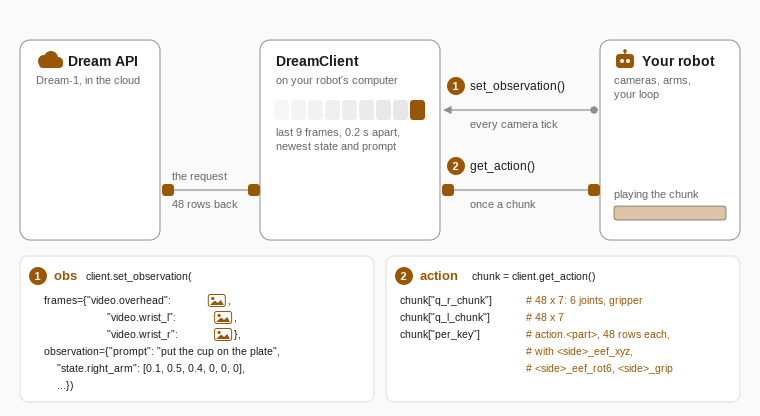
Your loop makes two calls. set_observation() on every camera tick (1) hands DreamClient the frames, the state and the prompt; it keeps the last 9 frames per camera, 0.2 s apart. get_action() once a chunk (2) sends them to the Dream API and returns the next 48 rows while the arms keep playing the current ones. The picture is slowed down 2.5 times.
def main():
    """Runs two tasks on the robot, one episode each, then prints the last call's timing."""
    robot = FakeRobot()
    with dream.DreamClient() as client:  # the key and addresses come from ~/.dreamlabs/credentials
        client.policy({"checkpoint": CHECKPOINT, "embodiment": YAM, "ik": {"arm": "yam", "head": "joint"}})
        for task in ("put the cup on the plate", "put the cup back"):
            client.reset_episode()  # a new task: a new session, and every camera's frames emptied
            chunks = run_episode(client, robot, task, max_rows=40)
            assert chunks > 0, "at least one chunk an episode"
            robot.home()
        print("last call:", client.last_timing)
dream.DreamClient()reads your key and the addresses from~/.dreamlabs/credentials(Getting started).client.policy({...})chooses the model and starts an empty set of frames for each camera; nothing is sent yet. The YAM model isdreamlabs/dream-1-beta;"ik": {"arm": "yam", "head": "joint"}has the client add each hand’s pose from the joints (below).client.set_observation(frames, observation)hands the client one camera tick: one frame from each camera and the robot’s state at that moment. Call it on every tick, at whatever rate your cameras run. It returns at once and never waits for the network.client.get_action()sends your newest state, with the last frames the client kept for each camera, and returns one chunk of actions. Its one argument is optional and keyword-only:commanded=, the joints your loop last commanded each arm, so the new chunk takes over where your loop is (DreamClient.get_action). The first call of an episode opens a session on the model.client.reset_episode()ends the session and empties every camera’s frames, so the next task starts with a clean memory. Call it before every new task.client.close(), or leaving thewithblock, ends the session and the connection.
The client takes one get_action() at a time: a second call from another thread while one is running raises DreamError. set_observation never waits for a get_action() running on another thread, so call it from your control loop and get_action() from a thread of its own.
Always pass embodiment, the YAM’s embodiment config: the state parts the model reads, the action parts it answers, and its camera roles. With it, the client checks every observation before sending it: a missing, misnamed or mis-shaped key raises DreamObservationError naming it, instead of reaching the model, and a reply whose parts are mis-shaped raises DreamActionError before you read it. Without it, nothing is checked before the call: an observation missing a key the model reads, or carrying one of the wrong width, is refused by the model as malformed (DreamBadRequest, never retryable), naming the key, after the round trip.
import base64
import threading
import time

import cv2
import numpy as np

import dream

CHECKPOINT = "dreamlabs/dream-1-beta"  # reads and answers each hand's pose; the client adds the poses (IK)
ROW_HZ = 20  # rows played per second, as our own loop plays them (the model was trained on rows 1/30 s apart)
ROW_S = 1 / ROW_HZ
FRAME_SIZE = (320, 176)  # width x height the model sees
CAMERAS = ("overhead", "wrist_l", "wrist_r")  # overhead: over the workspace; wrist_l and wrist_r: the wrist cameras

# The YAM's embodiment config: the parts your loop sends and reads back, and its camera roles. Passing it to policy()
# makes the client check every observation and reply.
YAM = {
    "state": {"right_arm": [0, 6], "right_gripper": [6, 7], "left_arm": [7, 13], "left_gripper": [13, 14]},
    "action": {"right_arm": [0, 6], "right_gripper": [6, 7], "left_arm": [7, 13], "left_gripper": [13, 14]},
    "video": {role: f"observation.images.{role}" for role in CAMERAS},
}
The get_action() schema
Section titled “The get_action() schema”This is the whole exchange: what your loop hands the client and what get_action() returns. set_observation takes two dicts. frames holds one frame per camera, under the key the model reads that camera under. observation holds every other key the model reads: the state and the prompt.
What you send: set_observation()
Section titled “What you send: set_observation()”| Key | In | Shape | Value |
|---|---|---|---|
prompt |
observation |
string | The task in words, for example put the cup on the plate. |
state.right_arm |
observation |
6 floats | The right arm’s joint angles, in radians: joint 1 (the base) to joint 6 (the wrist roll). |
state.right_gripper |
observation |
1 float | The right gripper: 0 closed, 1 open. |
state.left_arm |
observation |
6 floats | The left arm’s joint angles, in radians, same order. |
state.left_gripper |
observation |
1 float | The left gripper: 0 closed, 1 open. |
state.<side>_eef_xyz, state.<side>_eef_rot6, state.<side>_grip |
added by DreamClient |
3, 6 and 1 floats | Each hand’s pose and grip, which the model also reads. With ik the client adds them on every call; never send them (Hand poses are computed for you). |
embodiment |
added by DreamClient |
string | Whose state this is, for a Dream-1 base model: other_embodiment on an arm that is not a YAM, and the serve may then ignore the state (What the model reads on another arm). The client sends it when the robot key of the policy() config names one, and on its own with ik on an arm that is not a YAM; on a YAM, by default, it sends nothing. It is not the embodiment key of the policy() config, your embodiment config, which is never sent. Never send it: an observation that carries it is refused. |
video.overhead |
frames |
1 JPEG per call | The top camera, looking down over the workspace. get_action() sends the last 9 the client kept, one per 0.2 s (5 Hz), oldest first. |
video.wrist_l |
frames |
1 JPEG per call | The left wrist camera. get_action() sends the last 9 the client kept, one per 0.2 s (5 Hz), oldest first. |
video.wrist_r |
frames |
1 JPEG per call | The right wrist camera. get_action() sends the last 9 the client kept, one per 0.2 s (5 Hz), oldest first. |
Left and right are as the robot sees them. State values may be lists or NumPy arrays. A frame is a base64 JPEG string, 320x176 (below); how the 9 are picked is Which frames are sent.
Send the keys above and nothing else: they are the parts and camera roles of the YAM’s embodiment config, the same state.<part> and video.<role> form every model reads, and any other key is refused as malformed. The older YAM keys (state.arm_r.joint_pos and the like in observation, image_window.top and the like in frames) are still accepted but deprecated, and will be removed.
A model you fine-tuned reads the keys of the robot body it was trained on instead: in frames, one video.<role> for each camera role of that body’s video; in observation, one state.<part> for each part of its state, and prompt. For your own fine-tuned model, client.policy(...) loads that body for you and checks every observation against it, so you pass no embodiment.
What you get back: get_action()
Section titled “What you get back: get_action()”get_action() returns a dict. Read the two chunks; ignore any other key.
| Key | Shape | Value |
|---|---|---|
q_r_chunk |
48 rows x 7 | The right arm. In each row, values 0 to 5 are joint targets in radians, in the order of state.right_arm; value 6 is the gripper target, 0 closed to 1 open. With head joint, which this page runs, they are packed from the model’s joint answer (action.right_arm, action.right_grip); with head eef, your joints solved from its hand poses. Either way the chunk is smoothed before you see it (Playing the reply). |
q_l_chunk |
48 rows x 7 | The left arm, the same layout. |
per_key |
action.<part>: 48 rows x the part’s size |
The model’s answer per part of the embodiment config, as it came: the two chunks are packed from it and then smoothed, so they are not equal to it. A model that reads hand poses also answers them here: action.<side>_eef_xyz (3), action.<side>_eef_rot6 (6) and action.<side>_grip (1): where the TCP should be and how it should be turned, both absolute, in the arm’s base frame. On an arm that is not a YAM, a Dream-1 base model answers no joints: its action.<side>_arm is null (What the model reads on another arm). |
Targets are absolute positions, not changes, hand poses included. Row 0 is the target for the moment of the newest observation the call sent, and each next row is one step later. Every chunk is 48 rows: the model’s action horizon, set by the checkpoint and the same on every call. It is not a setting.
In per_key, a joint part is in radians, a gripper or grip part is 0 closed to 1 open (a <side>_gripper part of your own datasets is in the unit they recorded), and a tool-pose part is the end effector’s TCP, absolute, in the arm’s base frame: <side>_eef_xyz in metres, <side>_eef_rot6 the first two columns of its rotation matrix. It is all that a model not trained on YAM arms answers with.
The frames, the same on every arm:
- The base frame is the arm’s own, at its base: x forward, from the arm into the workspace; y to the arm’s left; z up. Each arm’s poses are in its own base frame.
- The TCP’s frame is at the point between the closed fingertips: z the way the fingers point, x along the line they close on, y = z cross x. With the hand pointing straight forward, x points to the arm’s left and y points up.
eef_rot6is the TCP frame’s x axis, then its y axis, each written in the base frame: the rotation matrix’s first two columns,[r00, r10, r20, r01, r11, r21]. The hand pointing straight forward is[0, 1, 0, 0, 0, 1]; pointing straight down, the fingers closing left to right, it is[0, 1, 0, 1, 0, 0]. Flip the sign of x and the model reads a hand turned half a turn about the fingers.
Each frame
Section titled “Each frame”- One frame per key. Each frame is one image, not a list: a JPEG (quality 85) encoded as a base64 string, with no
data:prefix. - Colours. Encode the picture as it looks: the model decodes every JPEG to RGB. OpenCV’s
cv2.imencodetakes a BGR image, so a camera that gives RGB is converted first,cv2.cvtColor(rgb, cv2.COLOR_RGB2BGR); without it, red and blue swap in what the model sees. - Size. The model sees 320x176 (width x height). Send that size to keep the upload small. A frame of any other size is stretched to it, never padded, and the model then trims 2.5% from each edge, as it did in training. The client does not decode or resize your frames.
- Shape. Use a 16:9 camera mode, such as 1280x720: most of the robot video Dream-1 was trained on is 16:9. If your camera has no 16:9 mode, center-crop each frame to 16:9 before you encode it, rather than sending a 4:3 or square frame: the model squashes any other shape into 320x176, so a 4:3 frame (640x480) reaches it 1.36x wider than it is, and a square one 1.82x. For an OpenCV image
frametaller than 16:9,h, w = frame.shape[:2]; top = (h - w * 9 // 16) // 2; frame = frame[top : top + w * 9 // 16]keeps its middle rows. A fine-tuned model needs the same crop as its recordings. The client never crops your frames; they are sent as they are. - The same cameras all episode. Every call of an episode carries the same keys in
frames. To change cameras, callclient.reset_episode()first. - A frame key is never in
observation. The client sends its own frames under that key.
def frame(image):
    """One camera frame as the model takes it: 320x176, JPEG quality 85, base64.

    @param image A BGR image from one of your cameras.
    @return The frame, a base64 str with no `data:` prefix.
    """
    small = cv2.resize(image, FRAME_SIZE, interpolation=cv2.INTER_AREA)
    ok, jpeg = cv2.imencode(".jpg", small, [cv2.IMWRITE_JPEG_QUALITY, 85])
    if not ok:
        raise RuntimeError("JPEG encoding failed")
    return base64.b64encode(jpeg.tobytes()).decode("ascii")


def observe(robot, prompt):
    """One camera tick: every camera's newest frame, both arms as they are now, and the task.

    @param robot Your robot's driver; camera(role) gives a camera's newest image, joints() each arm's joints.
    @param prompt The task, in words.
    @return (frames, observation), the two arguments of set_observation().
    """
    frames = {f"video.{role}": frame(robot.camera(role)) for role in CAMERAS}
    right, left = robot.joints()  # each: 6 joint angles in rad (base to wrist), then the gripper (0 closed, 1 open)
    observation = {
        "prompt": prompt,
        "state.right_arm": np.asarray(right[:6], dtype=np.float32),
        "state.right_gripper": np.asarray(right[6:], dtype=np.float32),
        "state.left_arm": np.asarray(left[:6], dtype=np.float32),
        "state.left_gripper": np.asarray(left[6:], dtype=np.float32),
    }
    return frames, observation
Which frames are sent
Section titled “Which frames are sent”The model reads each camera’s last 9 frames, 0.2 s apart. The client keeps them for you from the ticks you hand it:
- Spacing. The first tick of an episode is kept. After it, the client keeps one tick every 0.2 s: the one nearest each 0.2 s mark. From cameras at 30 frames a second, that is every sixth tick, even when a frame arrives a few milliseconds early or late.
- The window. For each camera,
get_action()sends the last 9 frames kept, oldest first. At the start of an episode, before 9 exist, it sends the ones kept so far, at least one per camera. - The newest state. Every call replaces the state and the prompt, whether or not its frames are kept, so
get_action()always sends the state of your lastset_observation. - Timestamps. By default a tick is timed at the moment you call
set_observation, ontime.monotonic(). If your camera driver gives the capture time on that clock, pass it astimestamp=. Within an episode, a timestamp is never earlier than the one before it. - Pauses. If you stop calling for a while, the 0.2 s marks start again from the first tick after the pause. Do not send a stale view: hand the client a tick only when your cameras have a new frame.
Two more keys of the policy() config set the window: obs_window, the frames sent per camera (default 9), and obs_fps, the frames kept per second (default 5). The defaults are what Dream-1 models read, your fine-tuned models included; leave them as they are.
Playing the reply
Section titled “Playing the reply”- Timing. The model learned rows 1/30 s apart, so 48 rows cover 1.6 s at the recorded speed. Our own control loop plays them at 20 rows a second, 2.4 s a chunk, for slower and steadier motion; the code here does the same (
ROW_HZ). - Smoothing. The client already joins each new chunk onto the one before it, a velocity blend over the first rows of the joints, and filters every column of the chunk, the gripper included, so
q_r_chunkandq_l_chunkdiffer a little fromper_key. Do not blend the seams again. - Limits. Nothing is limited for you: the model and the client do not clamp joints, speed or workspace. See Safety.
Running it in a loop
Section titled “Running it in a loop”A call takes a fraction of a second, so it must never block the loop that commands the arms. A pattern that works, and the one the code below follows:
- Hand the client every tick. Call
set_observationfrom your control loop each time the cameras have a new frame. The code here does it once a row. - Call off the control loop. Call
get_action()on its own thread, one call at a time. - Ask early. Ask for the next chunk before the current one runs out. On every row, call
client.refill_due(executed, remaining), with the rows of the current chunk you have played since it took over and the rows left, and ask when it returns True and no call is running. With no chunk, pass 0 rows left. Call it the same way in both pacing modes: it answers early while calls are fast (async) and only once the chunk has run out after a slow one (sync), as the paragraph below the list says. - Start at the row due now. When a chunk arrives, work out which row is due now from the moment the call went out, and continue from there. Skip the rows that are already past, and never replay from row 0.
- Hold when nothing is due. If no row is due (the first chunk has not arrived, or the last one ran out), hold the last command.
- Ramp in. At the start, and after a new session, move from the arms’ measured pose to the targets over at least 2 s, never faster than 0.5 rad/s for any joint.
refill_due times the calls from the round trips the client measures. By default, while a call takes 0.7 s or less, it asks so that the reply lands as the arms finish 30 rows of the chunk. After a slower call, it waits until the whole chunk has run, and the arms hold during the next call; client.mode says which of the two is in use. Three keys of the policy() config change the numbers: execution_horizon (30 rows), action_hz (20 rows a second; set it to the rate your loop plays rows) and sync_above_ms (700). See DreamClient.refill_due.
class Planner:
    """Calls get_action() on its own thread, one call at a time, so the control loop never waits on the network."""

    def __init__(self, client):
        """Starts with no call in flight and no reply.

        @param client The DreamClient, its policy open.
        """
        self.client = client
        self.thread = None
        self.result = None  # (t_obs, rows) from the last reply, or the error it raised
        self.lock = threading.Lock()

    def busy(self):
        """Whether a get_action() call is in flight.

        @return True while the call runs.
        """
        return self.thread is not None and self.thread.is_alive()

    def request(self):
        """Starts one get_action() call on its own thread; take() hands back what it returns."""
        t_obs = time.monotonic()  # row 0 of the reply is the target for the newest observation, handed in just now

        def call():
            try:
                action = self.client.get_action()  # the newest observation and every camera's kept frames
                rows = np.concatenate([np.asarray(action["q_r_chunk"]), np.asarray(action["q_l_chunk"])], axis=1)
                result = (t_obs, rows)  # [48, 14]: right arm and gripper, then left arm and gripper
            except dream.DreamError as error:
                result = error
            with self.lock:
                self.result = result

        self.thread = threading.Thread(target=call, daemon=True)
        self.thread.start()

    def take(self):
        """The newest reply or error, once.

        @return (t_obs, rows) for a reply, the dream.DreamError a call raised, or None when nothing new came.
        """
        with self.lock:
            result, self.result = self.result, None
        return result

    def wait(self):
        """Waits for the call in flight, if any; reset_episode() refuses to run beside one."""
        if self.thread is not None:
            self.thread.join()
def run_episode(client, robot, prompt, max_rows):
    """Plays Dream-1's chunks on the robot for one task, ROW_HZ rows a second.

    @param client The DreamClient, its policy open.
    @param robot Your robot's driver.
    @param prompt The task, in words.
    @param max_rows How many rows to play before the episode ends.
    @return How many chunks the model answered.
    """
    planner = Planner(client)
    plan = None  # (t_obs, rows, the row it took over at) being played
    chunks = 0
    retry_at = 0.0
    errors_in_a_row = 0
    played = 0
    next_tick = time.monotonic()
    while played < max_rows:
        frames, observation = observe(robot, prompt)
        client.set_observation(frames, observation)  # every tick; returns at once, even while get_action() runs
        now = time.monotonic()

        result = planner.take()
        if isinstance(result, tuple):
            t_obs, rows = result
            plan, chunks, errors_in_a_row = (t_obs, rows, int((now - t_obs) / ROW_S)), chunks + 1, 0
        elif isinstance(result, dream.DreamSessionExpired):
            plan = None  # the session restarted on our side: ask again, and ramp into the new chunk
        elif isinstance(result, (dream.DreamServerError, dream.DreamTimeout, dream.DreamProtocolError)) and getattr(
            result, "retryable", True
        ):
            # pool_warming (the model is starting), rate_limited, no reply in time: wait, then ask again.
            # A model that keeps failing the call (reason "error") is not retried forever: stop after a few in a row.
            errors_in_a_row = errors_in_a_row + 1 if getattr(result, "reason", None) == "error" else 0
            if errors_in_a_row > 3:
                raise result
            retry_at = now + (getattr(result, "retry_after_s", None) or 1.0)
        elif result is not None:
            raise result  # not retryable: a bad key, a bad observation, the spend cap

        row, executed, remaining = None, 0, 0
        if plan is not None:
            t_obs, rows, start = plan
            k = int((now - t_obs) / ROW_S)  # the row due now; rows already past are skipped, never replayed
            if k < len(rows):
                row, executed, remaining = rows[k], k - start, len(rows) - k
        if now >= retry_at and not planner.busy() and client.refill_due(executed, remaining):
            planner.request()

        if row is not None:
            robot.command(right=row[:7], left=row[7:])  # your limits and ramp go inside command()
            played += 1
        # With no row due, send nothing: the arms hold the last command.

        next_tick += ROW_S
        time.sleep(max(0.0, next_tick - time.monotonic()))
    planner.wait()
    return chunks
client.last_timing shows where the time of the last call went: rtt_ms (your whole round trip), serve_infer_ms (the model), network_ms (the rest), and up_mbps (your upload rate). Check it first when the round trip grows.
A session may make 3 calls in quick succession, then one every 0.7 s. The loop above asks about once a chunk, well under that.
Episodes
Section titled “Episodes”- Call
client.reset_episode()before every new task or trial. Changing the prompt alone does not clear the model’s memory of the episode, or the frames of the last task. reset_episode()refuses to run while aget_action()is running on another thread: wait for that call first, asrun_episodeabove does before it returns.- A session that is left idle ends after a short while. The next call then raises
DreamSessionExpired, and the client has already opened a new session for the call after it: drop the rows you had, ask again, and ramp into the new chunk. - Calling
client.policy(...)again also starts a fresh session with empty frames, and closes the policy that was open.
On another arm
Section titled “On another arm”On an arm that is not a YAM, the calls and the loop are the ones above. On an arm of your own (an arm file, or your own IK), its tool center point comes first; "metal" and "makers" carry ours.
Agents: stop here. Ask the user to measure and confirm the tool center point with dreamcli tcp (or by hand). Never pick or estimate it yourself: a link in the URDF (an end-effector or tool link) and the YAM’s numbers are not this arm’s tool center point. Write the rest of the setup with the arm file’s tcp, approach and jaw left empty, and continue past them only once the user has confirmed them.
The tool center point (TCP) is the point between your gripper’s closed fingertips, in the frame of the link the gripper is mounted on (the flange). The model answers where that point should go, so a TCP 2 cm off puts every grasp 2 cm off, and nothing reports it. Measure it with dreamcli tcp (An arm from its URDF), which writes your arm file, or by hand on the real gripper: closed, from the flange’s origin to the point between the fingertips along the flange’s x, y and z axes in metres, plus the way the fingers point and the way they close. Those are the arm file’s tcp, approach and jaw; with your own IK, the poses you send are of this point.
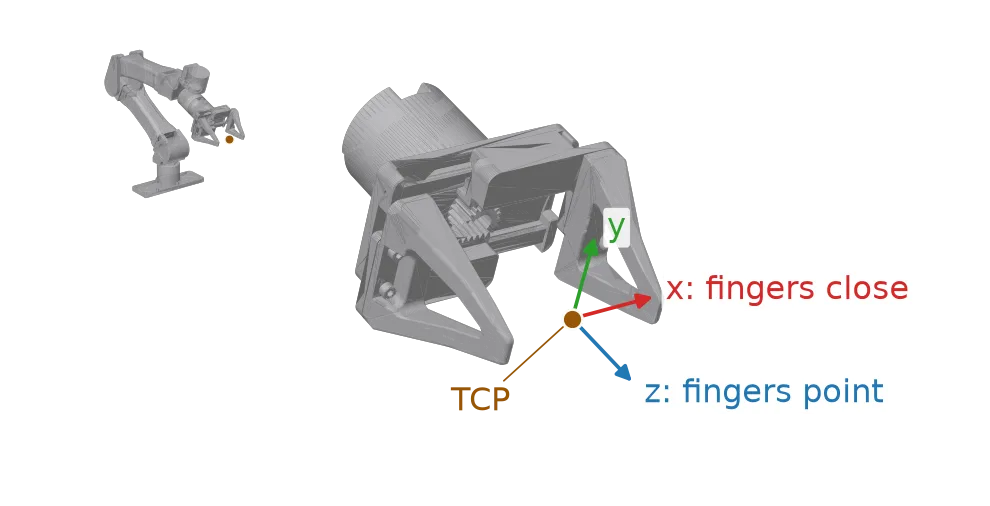
This is the stock YAM gripper’s tool center point, 0.135 m from the flange; the red, green and blue arrows are its x, y and z axes (x along the line they close on, y upward, z the way the fingers point). With any other gripper or mounting, even on a YAM, this is not your TCP: please measure it on your gripper and confirm it yourself.
What the model reads on another arm
Section titled “What the model reads on another arm”The Dream-1 base models, dreamlabs/dream-1-beta among them, were trained on YAM arms, so another arm’s joints, hand poses and grips are not values they learned. On an arm that is not a YAM, the serve may therefore ignore the request’s state (the joints, each hand’s pose and the grip), and the model acts on your cameras and the prompt.
Each hand’s pose still matters: the model answers each hand’s motion from where the hand is now, and that motion is applied to the hand pose your request carries to give the absolute pose it answers in per_key. The answer is anchored on that pose, so it must still be sent, and still be the TCP’s, absolute, in the arm’s base frame. The model answers no joints: per_key["action.<side>_arm"] is null.
The robot key of the policy() config says which case a call is. "other_embodiment" is an arm that is not the one the model’s state is from, so the serve may ignore its state. "yam" means these joints are the model’s own (a YAM, or the robot a model you fine-tuned was trained on), so the state is read as sent. The client sends it with every get_action() as the observation key embodiment, a string; it is not the embodiment key of the policy() config, your embodiment config, which is never sent. You rarely set it:
- With
ikon an arm that is not a YAM (route A below) and a model trained on YAM arms, the client sendsother_embodimentwithout being asked. - On your own IK (route B below, no
ik), put"robot": "other_embodiment"in thepolicy()config yourself: withoutikthe client does not know your arm. - Anywhere else nothing is sent unless you set
robot, and the model reads the state as sent. Arobotyou set always wins.
Any other value of robot is a DreamConfigError at policy(), and an observation that carries embodiment itself is refused with DreamObservationError. robot changes what the Dream-1 base models read; a model you fine-tuned reads the state of the robot it was trained on, whatever robot says.
Two ways to run your arm
Section titled “Two ways to run your arm”The model answers each hand’s pose, anchored on the one your request carries. Your arm moves by joints. Something has to turn joints into a hand pose on the way out (forward kinematics, FK) and the model’s hand poses back into joints on the way in (inverse kinematics, IK). Pick who does it:
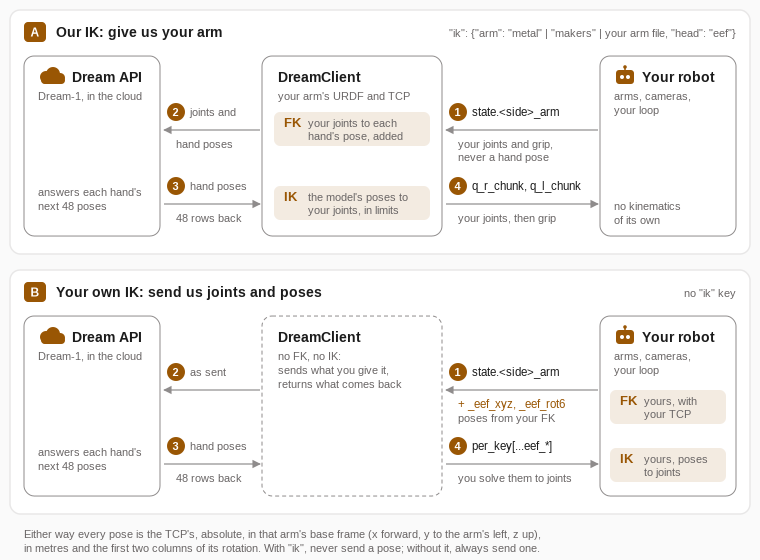
- A. Our IK: give us your arm. Put
"ik": {"arm": ..., "head": "eef"}in thepolicy()config,armbeing"metal","makers"or your arm file (your URDF and TCP). Send your joints and grip only.DreamClientadds each hand’s pose, sends both (for a Dream-1 base model, withembodimentother_embodiment, above), and solves the model’s answer back to your joints, within your URDF’s limits and joint speeds: drive the arm fromq_r_chunkandq_l_chunk. Sending a hand pose yourself is refused. This is the route to take unless you already have kinematics of your own. Afterpolicy(), the client compiles its trajectory solve on a thread for a few seconds (up to about 20 on one slow CPU core), solving row by row meanwhile: on an arm whose motors switch off when commands pause, a Metal arm’s grippers among them (500 ms), callclient.wait_for_ik(60)before you power it. - B. Your own IK: send us joints and poses. This is the route for a user-provided custom IK solver. Leave
ikout, and put"robot": "other_embodiment"in thepolicy()config. Send six zeros per arm as the joints (the model’s joint slots must be present, and their values may be ignored anyway), the grip, and each hand’s pose,state.<side>_eef_xyzandstate.<side>_eef_rot6, computed by your own FK: the serve may ignore these values, but the model’s hand poses are anchored on the pose you send.DreamClientsends them as they are and solves nothing: read the model’s hand poses fromper_key(action.<side>_eef_xyz,action.<side>_eef_rot6) and solve them to your joints yourself, with your own limits, smoothing and joins between chunks. The model answers no joints, so noq_r_chunkorq_l_chunkis packed from them: drive the arm from your IK’s joints only. Withoutrobot, the model reads your six zeros as a YAM’s joints beside your poses and grips, andq_r_chunkandq_l_chunkare its own joint answer, a YAM’s, not your arm’s: never drive the arm from them.
What a custom IK solver takes and gives on route B, per arm (<side> is right or left):
| Direction | Key | Shape | Unit and frame |
|---|---|---|---|
| You set | "robot": "other_embodiment" in the policy() config |
a string | Sent with every call as the observation key embodiment: the serve may ignore the state below |
| You send | state.<side>_eef_xyz |
3 floats | The TCP’s position, metres, absolute, in the arm’s base frame, from your FK; it may be ignored, but the model’s hand poses are anchored on it |
| You send | state.<side>_eef_rot6 |
6 floats | The TCP’s rotation, the first two columns of its rotation matrix, absolute, in the arm’s base frame; anchors the model’s hand poses with the position |
| You send | state.<side>_arm |
6 floats | Six zeros, whatever your arm’s joint count: the slots must be present, and their values may be ignored |
| You send | state.<side>_grip, state.<side>_gripper |
1 float each | The gripper, 0 closed to 1 open; it may be ignored like the rest |
| You get | per_key["action.<side>_eef_xyz"] |
48 rows x 3 | Where the TCP should be, metres, absolute, in the arm’s base frame: your IK’s input |
| You get | per_key["action.<side>_eef_rot6"] |
48 rows x 6 | How the TCP should be turned, absolute, in the arm’s base frame: your IK’s input |
| You get | per_key["action.<side>_grip"] |
(48,) |
The gripper target, 0 closed to 1 open, one value a row |
| You get | per_key["action.<side>_arm"] |
null | No joint answer: the model’s joints are not your arm’s |
| Your IK gives | your joint targets | 48 rows x your joints | Radians, within your arm’s limits and speeds, joined onto the motion already under way |
Either way every pose is the TCP’s (the point between your gripper’s closed fingertips), absolute, in that arm’s base frame, as What you get back describes. On route B your poses must follow it exactly: the model’s hand poses are anchored on yours, and it has no way to tell a pose in another frame or of another point, so it moves the hand somewhere else. The bullets below give the details of each route.
What changes:
-
The model. Use
dreamlabs/dream-1-beta: it answers each hand’s pose. -
The
ikkey of thepolicy()config:{"arm": ..., "head": "eef"},armbeing"metal","makers"or the path of your arm file, a JSON file that names your arm’s URDF and where its fingertips are (the setup wizard,dreamcli setup, writes one;DreamClient.policylists its keys). The client computes each hand’s pose from your joints and solves the model’s poses back to your joints, within your URDF’s limits. It needs Python 3.11 or newer. -
The embodiment config lists, per arm, your joints, the grip and the two hand-pose parts the client adds. The client refuses a part it does not list. The whole file is
another_arm.py(download it); itsFakeRobotstands in for your robot’s driver.CHECKPOINT = "dreamlabs/dream-1-beta" # it answers each hand's pose ARM_FILE = "my_arm.json" # a JSON arm file naming your URDF and TCP (dreamcli tcp writes it), or "metal" or "makers" JOINTS = 6 # your arm's moving joints, base to flange CAMERAS = ("overhead", "wrist_l", "wrist_r") # one scene camera, then the left and right wrist cameras # Your robot's embodiment config: per arm, the joints and the grip your loop sends and the hand's pose the client adds # (xyz, then the rotation's 6 numbers), then the camera roles. The client reads the cameras from it, and checks every # observation against it. STATE = {} for side in ("right", "left"): for part, width in (("arm", JOINTS), ("grip", 1), ("eef_xyz", 3), ("eef_rot6", 6)): start = sum(end - begin for begin, end in STATE.values()) STATE[f"{side}_{part}"] = [start, start + width] EMBODIMENT = { "state": STATE, "action": STATE, "video": {role: f"observation.images.{role}" for role in CAMERAS}, } CONFIG = { "checkpoint": CHECKPOINT, "embodiment": EMBODIMENT, "ik": {"arm": ARM_FILE, "head": "eef"}, # the client turns the model's hand poses into your joints }
-
Send
state.<side>_arm(your joints in radians, base to flange) andstate.<side>_grip(0 closed, 1 open) in place ofstate.<side>_gripper, and never the hand poses orembodiment. The client adds each hand’s pose from your joints and sendsembodimentother_embodiment: the serve may ignore that state, the model acts on your cameras and the prompt, and it answers each hand’s pose anchored on the one the client computed (What the model reads on another arm). -
Read
q_r_chunkandq_l_chunkas on a YAM: each row is your joints in the same order, solved from the model’s hand poses, then the gripper. The model’s own hand poses stay inper_key, where its joint answer,action.<side>_arm, is null. -
Your own IK. Leave
ikout, put"robot": "other_embodiment"in thepolicy()config, and send the hand’s pose yourself (state.<side>_eef_xyz,state.<side>_eef_rot6), the gripper as bothstate.<side>_gripperandstate.<side>_grip, and six zeros asstate.<side>_arm, whatever your arm’s joint count: the model’s six joint slots must be present, and their values may be ignored, as they are withik. The action parts are<side>_arm(null in every reply),<side>_grip,<side>_eef_xyzand<side>_eef_rot6. Solveper_key’s poses, and smooth and join the chunks yourself. -
Cameras. Exactly three: one scene camera (
video.overhead) and two wrist cameras (video.wrist_l,video.wrist_r). For a camera your robot does not have, send a black frame, never another camera’s view. -
One arm. Run it as the right arm. Send the left as a fixed parked pose with grip 1 and a black
video.wrist_l, never playq_l_chunk, and name only the right arm in the prompt. -
Safety is as below, with your arm’s limits. The solve trusts your URDF’s limits: check them against the real arm.
Errors
Section titled “Errors”Every error is a dream.DreamError. The ones a control loop handles:
| Error | What it means | What to do |
|---|---|---|
DreamServerError, reason pool_warming |
The model is not running and is starting. This happens on the first call after the model has been idle. | Wait retry_after_s (30 s) and ask again, and keep asking: dreamlabs/dream-1-beta is normally kept running, but a model started from cold can take up to about half an hour. |
DreamServerError, reason rate_limited |
Calls came too fast. | Wait retry_after_s (0.7 s) and ask again. |
DreamTimeout, DreamProtocolError |
No reply in time, or no connection. | Hold, wait 1 s, ask again. |
DreamSessionExpired |
The session was restarted on our side. | Drop your rows, ask again, ramp in. |
DreamAuthError |
The key is wrong or revoked, or the account reached its spend cap. | Stop; fix the key or the billing. |
DreamObservationError |
The observation does not match embodiment (the message names the key), or get_action() was called before any set_observation of the episode. |
Stop; fix the observation. |
DreamConfigError |
A call came before client.policy(...), or the policy config is wrong; the message names the key. |
Stop; fix the call order or the config. |
For any DreamServerError, retryable says whether the same call can succeed later. If it is true, wait retry_after_s, or 1 s when it is not set, and ask again. An observation the model cannot read (a camera or state key missing, a state of the wrong width, a frame that does not decode) is refused as malformed, a DreamBadRequest that is never retryable: the message names what to fix. A model that fails for a reason of its own answers error, which is retryable; a model that keeps failing the same call will not recover by itself, so stop after a few of those in a row instead of retrying forever. Every code and reason is listed in Error codes.
set_observation raises DreamObservationError, naming the key, and keeps nothing of the call when:
- a frame is bytes instead of a base64 string, or empty;
- a key is in both
framesandobservation; - the keys in
framesdiffer from the episode’s earlier calls; - the timestamp is earlier than the last call’s.
Troubleshooting
Section titled “Troubleshooting”- The robot does the wrong thing. Run
python -m dream.checkwith your loop as it is now (Check it before the first real run) and go by its FAULT line: fix what a LOOP line or the page names, then run it again. When you write to us about a run, send its last four lines, LOOP, INPUTS, MODEL and FAULT.
Safety
Section titled “Safety”The model’s targets are not checked for your robot. Your loop must:
-
Ramp into every new chunk from the measured pose (see above).
-
Limit speed. Our own loop keeps the end effector under 0.6 m/s, and moves each gripper by at most 0.05 a row.
-
Keep joint limits, in radians:
Joint 1 2 3 4 5 6 Min -2.618 0 0 -1.571 -1.571 -2.094 Max 3.054 3.65 3.665 1.571 1.571 2.094 -
Hold when a camera’s newest frame is older than 0.2 s, or no row is due.
-
Keep a hand on the e-stop whenever the arms are powered.